
Key takeaways
- What a content management system is and who it is built for
- How HubSpot's drag-and-drop editor makes page updates easy
- Why having website, marketing and sales tools on one platform matters
- How HubSpot's SEO tools, built-in SSL, training and themes support a site
- What to ask your team before moving your website to HubSpot
On this page
For years, our team has been helping our clients crush their personal business goals. As platinum HubSpot Partners, it’s no secret that we love working in the HubSpot platform. Today we are going to be covering The HubSpot Content Hub, and the top reasons why we think you should consider using it for your next website project.
What is a CMS?
Like WordPress, Squarespace, or WIX, a CMS or “content management system” is the software that enables you to build, launch, manage and monitor your website pages and content. Often, the usability of a CMS caters to non-technical users, allowing them to easily create content without having to write a single line of code.
What we love about HubSpot CMS Hub: Top 5 Features
The HubSpot Content Hub was first released in 2020 as CMS Hub, and the capabilities and growth of the platform show no signs of slowing down. The number of sites using the HubSpot Content Hub have already grown to over 90,000 since its release. Here are just a few of the reasons why we’re recommending the CMS to more and more of our clients.
1. Ease of use
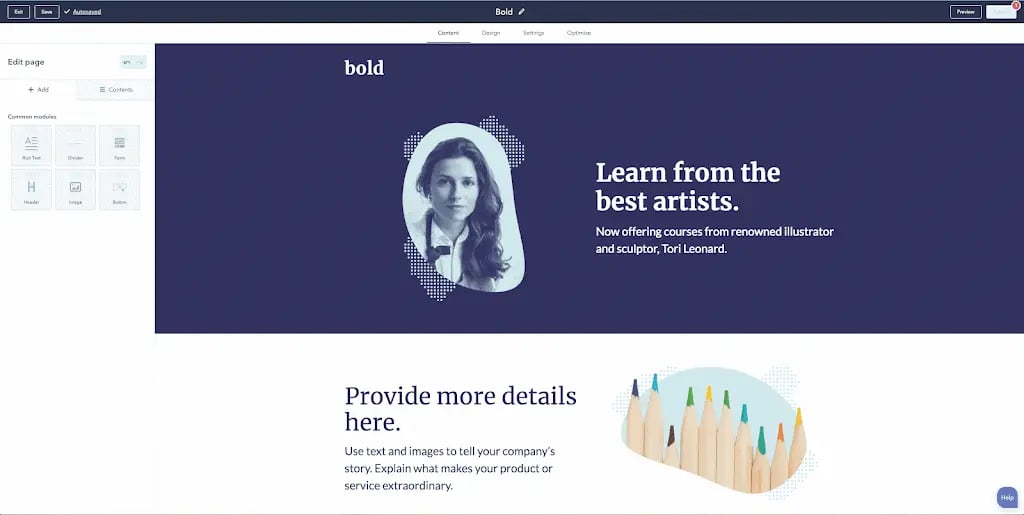
As a designer, these four words are music to my ears… drag-and-drop editor. HubSpot’s drag-and-drop interface for page and post building provides invaluable flexibility that enables marketers, designers and developers alike to make quick and easy content updates on the fly. With this functionality, page sections are building blocks that can be moved, arranged and styled without getting lost in a sea of complex code.
2. Complete marketing solution
The gang’s all here! One of the biggest advantages of HubSpot is being able to manage every aspect of your marketing under one roof. HubSpot provides not only a CMS for your website, but also:
- A Marketing Hub where you can create landing pages and campaigns to grow your audience. You can also create and publish blogs and emails, as well as automate your marketing workflows if you choose to take advantage of HubSpot’s premium offerings.
- A Sales Hub with a free CRM as well as paid premium tools that allow you to automate your sales process with everything from professional sequences to predictive lead scoring.
The best part? Because all of these value adds are in the same place, HubSpot’s data analytics capabilities give you a holistic view of your data, from your individual campaigns to your website performance.
3. Stronger SEO capabilities
What good is a beautifully designed site with an impeccable user experience if your target audience doesn’t know you exist? Enter Search Engine Optimization! A strategic approach to your content creation, paired with the due diligence of your on-page technical SEO (such as choosing the right keyword and optimizing your page titles) is vital to making sure all of your hard work is paying off and you’re getting seen by the right people.
One of the newest and most exciting capabilities is the Content Hub's new functionality around SEO. HubSpot’s SEO tool gives you the power to scan all live pages for SEO tips and recommendations.
In just a couple of hours, you have a comprehensive list of recommended improvements grouped by category and prioritized by potential impact.
One additional benefit is that the HubSpot Content Hub comes with a built-in Secure Sockets Layer (SSL). An SSL is an encryption protocol for web server and browser links, and a standard in website security. This is a huge benefit for the safety of the data you’re collecting, and a solid SEO value add.
4. Education, community and training
Whether you are looking to expand the connections you have in your professional network or brush up on your best practices, HubSpot’s Help Center has something for everyone:
- HubSpot Academy offers free courses and certificate programs on everything you need to advance your digital marketing skill set.
- HubSpot Community provides a venue for you to ask questions, discuss, and get wisdom from other HubSpot customers.
- HubSpot Partner Network is a directory of professional agencies ready to help you to achieve your goals and take the leap into the HubSpot environment.
5. Growing website design and theme design options
HubSpot Content Hub is much younger than a lot of the competing CMS’s out there. As a result, it has fewer themes than some of the others. But the HubSpot Community consistently offers beautifully designed and easy-to-use free and paid themes to make your website build a breeze.
HubSpot’s Asset Marketplace is a valuable source for out-of-the-box websites, landing pages, email themes and more.
And did you know we have created our own free HubSpot website theme? Check it out here.
Success in numbers
- Its customer base has grown to 113,925 customers in 120+ countries.
- In two years the number of websites using the HubSpot Content Hub has grown to more than 90,000.
- HubSpot boasts 99.9% uptime for websites using their platform. (Talk about peace of mind.)
After moving to HubSpot Content Hub, our client DDPS saw a 105% increase in their conversion rate. Read the full case study here!
Is HubSpot Content Hub right for you and your company?
Before taking the next steps and signing up for HubSpot, do the research. Talk to your team. They’re the ones that will be using your website and marketing infrastructure on a day-to-day basis. Ask them questions like:
- What are they looking for?
- What type of training will they need?
- What are their primary concerns with the platform?
Think about any current gaps in your process, and see if they could be filled by HubSpot’s numerous capabilities. Then, reach out to a HubSpot Content Hub professional like us to help walk you through the next steps. We would be happy to help!
Frequently asked questions
What is a CMS?
A CMS, or content management system, is the software you use to build, launch, manage and monitor your website pages and content. Most are designed so non-technical users can create content without writing code. WordPress, Squarespace and Wix are common examples.
Is HubSpot's CMS easy to use?
Yes. Its drag-and-drop editor lets marketers, designers and developers update pages without touching complex code. Page sections work as building blocks you can move, arrange and style. This makes quick content changes easy.
Why use HubSpot for your website instead of a separate CMS?
HubSpot puts your website, marketing tools and sales tools on one platform with the CRM. Because everything sits in one place, you get a single view of data from individual campaigns through website performance. You can manage landing pages, blogs, emails and sales automation without stitching tools together.
What SEO features does HubSpot's CMS include?
HubSpot's SEO tool scans your live pages and returns recommendations grouped by category and ranked by potential impact. Sites also come with a built-in SSL certificate, which protects the data you collect and supports SEO. Good on-page work, such as choosing the right keywords and optimizing titles, still matters.
How do I know if HubSpot's CMS is right for my company?
Talk to the team that will use the website every day before you sign up. Ask what they need, what training they will require and what concerns they have about the platform. Then check whether HubSpot's capabilities fill the gaps in your current process.